 Teaching Mate
Sign in
Create an online course with pages, quizzes and flashcards
The Teaching Mate Studio is where teachers build courses for their students. A course is a tree of topics: each topic has a page to read, word lists, quizzes and flashcards, and its words can be heard. You make it in the browser, your students learn from it on a computer or a phone, and none of it costs anything.
Open the Studio Read the course-making guide
Three ways to start
- From a small example. A new course starts with one topic that already has a page, a word list, a quiz and a set of flashcards that use each other. Change the words and the text, and you have your first lesson.
- From your own materials. Upload files, a whole folder or a ZIP of the course folder. After a ZIP upload the Studio checks the course and lists anything that is broken, such as a page that points to a quiz that does not exist.
- From a free course. Copy a public course, such as Spanish for beginners or Math for 7th grade, into your Studio and change it to suit your class. The copy is yours: later changes to the original do not touch it.
What a course is made of
- Topics. A tree of topics and subtopics, each with its own icon. In the Studio you add, rename, move, indent and remove them.
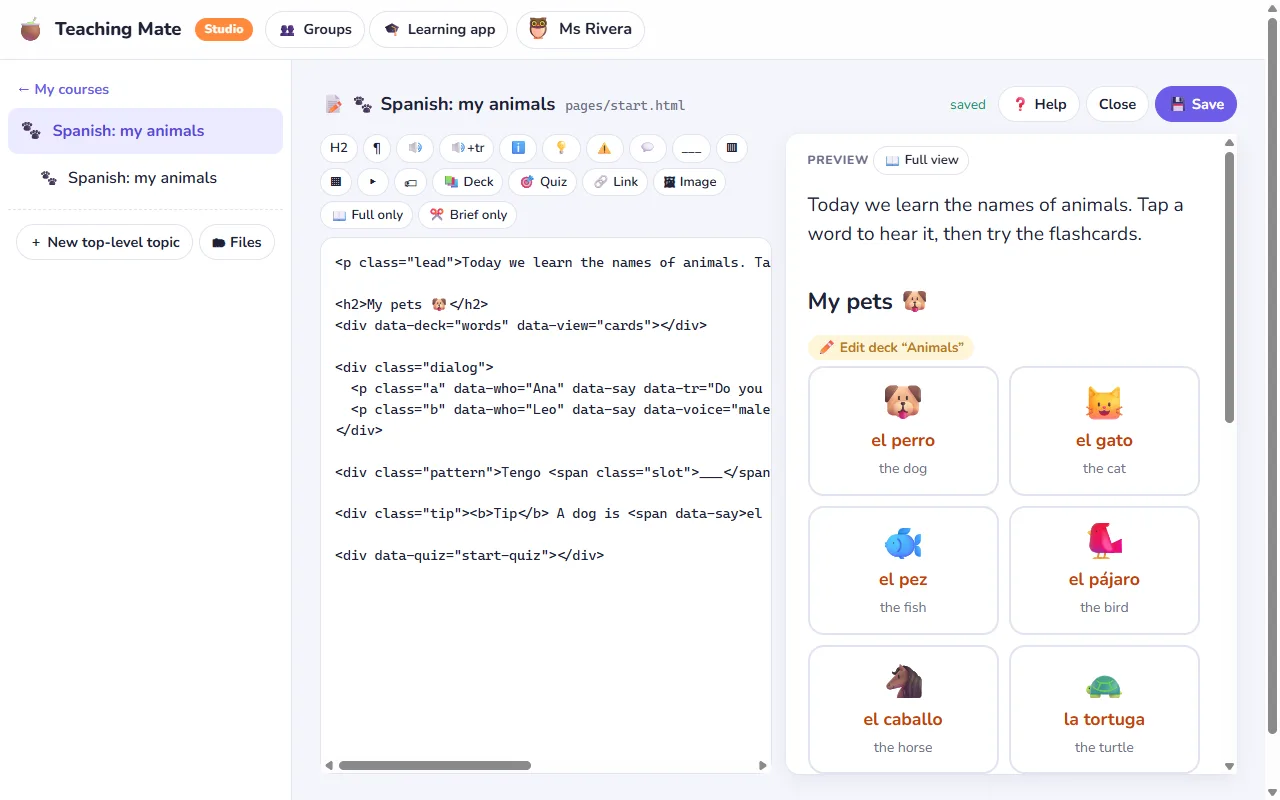
- Pages. One page per topic. The page editor has buttons for the usual building blocks: headings and paragraphs, words that are spoken when tapped, phrases with their translation, note, tip and "watch out" boxes, dialogues between two speakers, sentence patterns with a blank, two columns, tables, answers that open on a tap, and pictures. A page can also show a word list as cards or a table, and start a quiz.
- Word lists. Each word has its meaning and, if you like, an emoji or a picture, a note and an example sentence. You edit a list as a table and listen to each word as you go.
- Quizzes and flashcards. Write the questions yourself, or let the quiz make them from a word list. The quiz maker page has the details.
- Pictures. Upload images and use them on pages and in questions.
- Brief or full. Mark which parts of a page are explanations and which lines are the short version. Each learner then reads the full page or the brief one, chosen by them or by their teacher.
When a course opens, it shows three big buttons: How to use (a short page you write), Learn (the topics) and Take a quiz (all the quizzes, the final test first). Students know at once where to go.
Every word can be heard
Words and sentences you mark as speakable on a page, and the words in word lists and quizzes, are read aloud when a student taps them. Spanish is recorded with natural voices from ElevenLabs a few seconds after you save, with a woman's and a man's voice for dialogues. Other languages are read by the learner's device with its own voice. Each author has a monthly allowance of recorded characters. A slow-audio button, the turtle, plays everything more slowly. More on the flashcards and audio page.
Who sees your course
- Private: only you, and the students of the groups you give it to.
- Anyone with the link: share it with a class or a colleague. It is not listed anywhere.
- Public: listed in the library inside the app, where learners find it by its title, keywords and the names of its topics. Other teachers can copy it.
The Studio shows how many people have your course, how many used it in the last 30 days, how many quiz attempts there were and the average score. It never shows who they are: you see names only in your own groups. How groups work.
Safe for students
Pages written by teachers are cleaned before anyone sees them: no scripts, forms or frames. Uploaded files are served so that they can never run as a page of the site.
Your course stays yours
Download any course as a ZIP whenever you like, as a backup or to work on it elsewhere, and upload a new version the same way. A course is a folder of plain files (HTML pages and JSON lists), so you can also write it in your own editor. The guide course How to make a course shows every building block working, with the code next to it.
What it costs
Nothing. Teaching Mate is free for teachers and for students, and it shows no ads. Sign up as a teacher with your email or with Google, and the Studio is ready.